

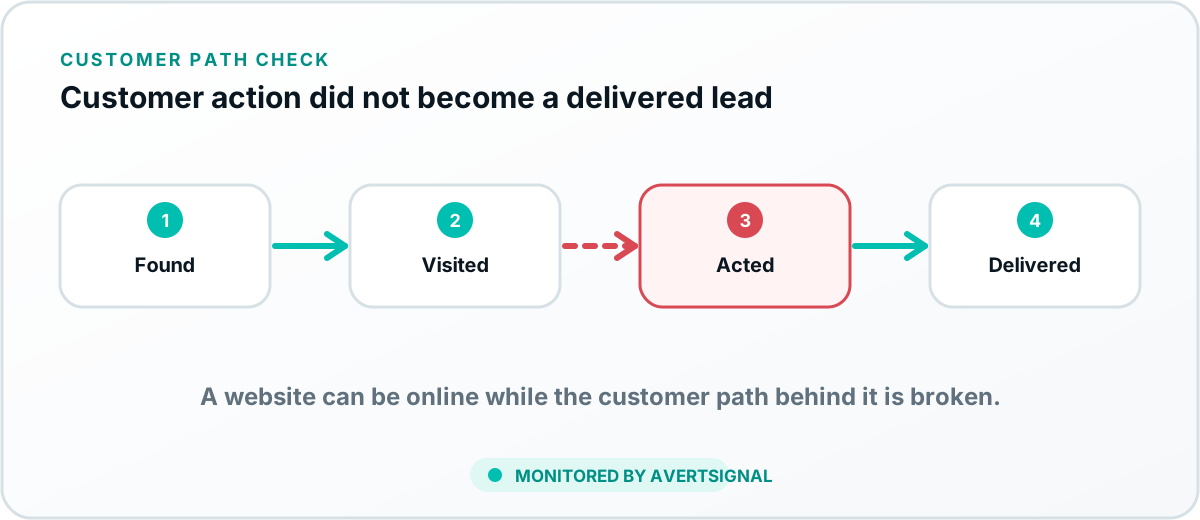
If your website is online but leads have slowed or stopped, check the complete path in order: visibility and traffic, landing pages, phone links, forms, booking tools, conversion tracking, notifications, integrations, CRM delivery, lead assignment and follow-up. Uptime proves the page responded. It does not prove a prospect could become a delivered lead.
First, separate weak demand from a system failure
A lead decline can begin before the website, on the website, or after the visitor completes an action. That distinction matters because each problem has a different owner. A traffic decline may belong to advertising, search visibility or seasonality. A conversion decline may involve the landing page, phone link, form or booking flow. A delivery decline may involve email, automation, CRM routing or employee response.
Start by comparing three numbers over the same period: qualified visits, completed customer actions and delivered leads. If traffic fell at roughly the same rate as leads, investigate demand and acquisition channels. If traffic stayed steady but calls, forms or bookings fell, investigate the customer-facing path. If tracked conversions stayed steady but delivered leads fell, investigate notifications, integrations and CRM delivery.
1. Check every important customer entry point
Do not test only the homepage. Prospects may enter through a Google Business Profile, a location page, a service page, a paid landing page, a directory listing or a booking link. Confirm that the most valuable entry points lead to the correct current destination.
- Search your business name and primary services from a clean browser session.
- Open the website, call and appointment links shown on public listings.
- Check paid-ad and email-campaign landing URLs.
- Confirm redirects do not remove source information or send visitors to a generic page.
2. Test phone numbers and click-to-call links
A phone number can look correct while the clickable link contains an old tracking number or the route forwards to the wrong location. Test from a mobile device and follow the call far enough to confirm the expected business destination, menu and after-hours handling.
For a deeper call-path audit, use the guide on how missed and misrouted calls cost small businesses.
3. Test forms from submission to final delivery
Submit each high-value contact, quote and consultation form using a unique name and email address. A successful thank-you message is only one checkpoint. Confirm the business notification, stored entry, automation run, CRM record and assigned owner.
If the visible form succeeds but email does not arrive, follow the website form email troubleshooting process. For a complete test framework, see how to know whether a contact form is actually working.
4. Complete the booking path like a customer
Open the public scheduler, choose each important service or location, confirm that appropriate availability appears and complete a controlled appointment. Verify the customer confirmation, staff calendar, internal notification and connected CRM record. A calendar that loads but shows no usable appointments is still a broken acquisition path.
5. Verify conversion tracking without mistaking it for delivery
Google Analytics and advertising platforms can record calls, form submissions and booking events. Those signals help diagnose marketing performance, but they do not prove the business received a lead. Confirm important events in real time or debug tools, then compare them with notifications and CRM records.
The guide on why conversion tracking is important explains what measurement can prove and where it stops.
6. Inspect notifications, automation and integration logs
Look for failed email sends, paused automation tasks, expired credentials, rejected webhooks and field-mapping errors. Changes to a form, CRM field, user account or security setting can break only one lead type while everything else appears normal.
- Check email and SMS notification history.
- Review automation or integration execution logs.
- Search the CRM across every pipeline, owner and duplicate record.
- Confirm the receiving employee is still active and correctly assigned.
7. Trace one test lead into the CRM
Use a unique test value and follow the record from the public customer action to its final destination. Confirm field values, lead source, pipeline, location, owner and notification. The detailed diagnostic in why website leads are not reaching the CRM covers the most common handoff failures.
8. Review what happens after the lead arrives
A working system can still lose the customer if ownership is unclear or follow-up is inconsistent. Confirm that every lead type has a named owner, response expectation, fallback process and visible status. A CRM helps create that shared record, which is why the article on why a CRM is important for a small business belongs in the same diagnostic path.
9. Look for recent changes
The timing of the lead decline often identifies the likely cause. Review website deployments, plugin updates, new landing pages, domain or DNS changes, email-provider changes, CRM edits, new staff, departed staff, call-routing updates, booking configuration and consent-banner changes.
Do not let a recent redesign become the automatic suspect
Use evidence. Compare the date of the decline with the date of each change, then test the exact customer action. Otherwise every provider gets to blame the other provider, a cherished business tradition that fixes absolutely nothing.
10. Run a 30-minute lead-path triage
- Open the primary Google profile and highest-value landing page.
- Call the main public number from a mobile device.
- Submit the primary form with a unique test identity.
- Complete the main booking flow if the business uses one.
- Check analytics or call-tracking events.
- Confirm notifications, inboxes and CRM records.
- Verify the correct employee received ownership.
If one test fails, repeat it after the repair and preserve the evidence. That is more useful than simply changing something and waiting to see whether next month feels better.
11. Protect the path continuously
Manual testing is useful for diagnosis but unreliable as a permanent control. High-value customer paths should be monitored regularly and after meaningful changes. The broader guide on how to stop losing website leads explains how to prioritize the routes that deserve continuous protection.
12. Where AvertSignal fits
AvertSignal is designed to connect the pieces that separate tools report independently. It monitors the path from discovery through customer action and lead delivery, explains the business effect, establishes ownership and keeps the issue open until the original path works again.
The practical goal
Do not merely prove that the website is online. Prove that a prospect can find the business, contact it, create a lead and reach the person responsible for responding.